
Download PodLM – AI‑Powered Text to Podcast Converter
Overview – Transform Text into Engaging Podcasts
PodLM is a cloud‑based, AI‑driven web application that converts any written material—web pages, PDFs, Word documents, or plain text—into polished, ready‑to‑publish podcasts. Designed for marketers, educators, podcasters, and enterprises, the platform removes the technical barrier of audio production, allowing users to generate professional‑grade episodes in minutes instead of hours. With a subscription‑only model, PodLM delivers a secure, continuously updated service that scales with your content pipeline, offering unlimited revisions, regular AI‑model upgrades, and compliance with GDPR and CCPA.
The intuitive dashboard lets non‑technical users create, edit, and publish audio without ever touching a microphone or traditional editing software. In addition to the core conversion tools, PodLM provides a robust RESTful API, enabling developers to embed podcast generation directly into existing workflows, content management systems, or learning platforms. By automating the voice‑over process, PodLM not only saves time and money but also expands your reach to the rapidly growing audience that prefers listening over reading.
Whether you need a single podcast episode from a blog post, a batch conversion of an entire knowledge base, or a personalized audio message for email campaigns, PodLM delivers consistent, high‑quality audio that can be customized to match your brand’s tone and style. The service also includes analytics, secure cloud storage, and multi‑voice options, making it a comprehensive solution for anyone looking to turn text into engaging audio content.
Core Features & Customization Options
Feature List
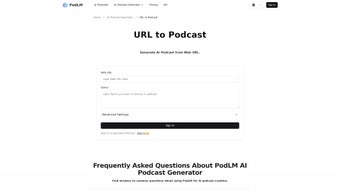
- URL to Podcast: Paste any public web address and let PodLM extract the main content, summarize it, and generate a narrated episode.
- Text to Podcast: Upload .txt, .docx, .pdf, or copy‑paste raw text for instant conversion.
- Chat Podcast: Use the built‑in chat interface to ask the AI to rewrite, summarize, or expand content before turning it into audio.
- Voice Library: Choose from multiple AI‑generated voices, each with adjustable speed, pitch, and emotion controls.
- Audio Editing Suite: Trim silences, add intro/outro music, insert ads, and apply noise reduction directly in the browser.
- Bulk Processing: Queue up to 50 documents at once for batch podcast creation—ideal for e‑learning platforms.
- API Integration: RESTful endpoints with API keys for automated podcast generation within your own apps.
- Analytics Dashboard: Track listens, drop‑off points, and listener demographics for each episode.
- Secure Cloud Storage: All generated audio files are stored encrypted, with options for direct download or cloud linking.
- Regular Updates: Monthly AI model improvements and new voice additions keep your podcasts fresh.
Advanced Customization
PodLM understands that brand consistency matters. The platform lets you upload custom voice profiles or fine‑tune existing AI voices to reflect your brand’s personality—whether you need a calm, authoritative tone for corporate briefings or a lively, conversational style for marketing newsletters. You can embed your logo into the audio metadata, making it easy to organize and distribute episodes across podcast directories.
The built‑in scripting tool allows you to add dynamic placeholders (e.g., “Hello, [FirstName]”) for personalized audio messages in email campaigns. For developers, the API provides granular control over every parameter, from text preprocessing to final bitrate, enabling seamless integration with content pipelines like WordPress, HubSpot, or custom LMS solutions. Additional customization layers include background‑music libraries, automatic ad‑insertion rules, and multi‑language support, ensuring every episode not only sounds professional but also aligns perfectly with your strategic communication goals.
These capabilities turn a simple text‑to‑speech conversion into a fully branded audio experience that can be scaled across departments and markets.
Installation, Usage & Compatibility
Getting Started – No Installation Required
Because PodLM is a web‑based SaaS, there is no traditional installation process. Users simply sign up on the official website, verify their email, and choose a subscription tier that fits their volume needs. Once logged in, the dashboard greets you with a clean, responsive layout that works on any modern browser.
The onboarding wizard walks you through the first conversion: you can either paste a URL, upload a document, or type text directly into the editor. After confirming voice and styling preferences, click “Generate Podcast,” and the AI begins processing. Within seconds to a few minutes—depending on length—the finished audio appears in the “My Episodes” library, ready for download or direct publishing to platforms like Spotify, Apple Podcasts, or your own site via an embed code.
System Requirements & Operating System Support
PodLM runs entirely in the cloud, so it is compatible with Windows 10/11, macOS Ventura and later, Linux distributions with a modern browser, as well as mobile operating systems Android 11+ and iOS 14+. The service leverages WebAssembly and WebGL for real‑time audio preview, so a stable internet connection (minimum 5 Mbps) and an up‑to‑date browser (Chrome, Edge, Firefox, Safari) are recommended. Because no local files are stored permanently, the application complies with GDPR and CCPA, offering data‑export options for users who need to retain copies of their generated podcasts.
Step‑by‑Step Workflow
- Create a Project: Click “New Podcast” and give it a descriptive title that reflects the source content.
- Import Content: Choose “URL,” “Upload,” or “Paste Text.” The AI automatically extracts headings, removes navigation elements, and creates a logical speaking flow.
- Configure Voice: Select a voice, set speed (0.75x–1.5x), adjust pitch, and optionally add background music from the built‑in library.
- Generate & Edit: Press “Generate.” Use the built‑in editor to trim silence, insert timestamps, add ad breaks, or overlay sound effects.
- Publish or Download: Export as MP3 (128 kbps default, 320 kbps optional) or copy the embed code to your website. You can also push the file directly to Spotify or Apple Podcasts via integrated publishing tools.
The entire process is designed for speed and simplicity, meaning you can turn a 2,000‑word article into a 12‑minute podcast in under five minutes—freeing up resources for content strategy rather than production. For power users, the API mirrors this workflow, allowing bulk submissions, automated status callbacks, and programmatic retrieval of finished files.
Pros, Cons, FAQ & Final Thoughts
Pros
- Fast, AI‑driven conversion from any text source.
- Multiple high‑quality synthetic voices with fine‑tuning.
- Zero‑code interface—perfect for non‑technical marketers.
- Robust API for developers and automation.
- Secure cloud storage and GDPR‑compliant data handling.
- Built‑in analytics to measure podcast performance.
- Bulk processing for large content libraries.
- Regular AI model updates keep voices natural.
Cons
- Subscription pricing may be steep for occasional users.
- Limited offline capabilities—requires internet access.
- AI voice, while natural, may not fully replace a human narrator for highly emotive storytelling.
- Bulk processing queue can experience short delays during peak usage.
- No native desktop client; everything runs in a browser.
Frequently Asked Questions
Can I use my own voice recordings with PodLM?
PodLM currently focuses on AI‑generated voices. However, you can upload your own recordings as supplemental audio tracks and combine them with AI narration using the built‑in editor.
Is there a free trial or a free tier?
Yes, PodLM offers a 7‑day free trial with access to all core features and up to three podcast generations. After the trial, you’ll need to choose a paid subscription.
How does PodLM handle copyrighted material?
PodLM does not host or redistribute source content. Users are responsible for ensuring they have the right to convert the text they upload. The platform provides a compliance checklist during the upload process.
Can I integrate PodLM with my existing CMS?
Absolutely. The RESTful API includes endpoints for content submission, voice selection, and retrieval of the generated MP3. Detailed documentation and SDKs for WordPress, Drupal, and custom platforms are available.
What export formats are supported?
PodLM exports podcasts primarily as MP3 (128 kbps or 320 kbps). You can also download the raw WAV file for further professional editing if needed.
Review Summary
PodLM delivers a powerful, user‑friendly solution for turning written content into polished podcasts. Its AI voice quality rivals many premium text‑to‑speech services, and the added API makes it a versatile tool for both marketers and developers. While the subscription cost may be a barrier for occasional users, the time savings and ability to scale audio production quickly outweigh the price for most businesses. Overall, PodLM earns a solid 4.5 out of 5 stars.Conclusion & Call to Action
If you’re looking to expand your content strategy into the booming audio market, PodLM offers a secure, fast, and highly customizable way to generate podcasts without the need for a recording studio. Its web‑based interface ensures you can start creating immediately on any device, while the API opens doors for automation across your existing workflows. Take advantage of the 7‑day free trial today, and experience how effortless podcast production can become. Download PodLM now, convert your first article, and let your brand’s voice be heard across the world.



.png)



